
Search is a central part of the Sales Navigator experience. In the new update, it has been reconfigured to reduce the time it takes to find effective results.
Sales Navigator search includes:
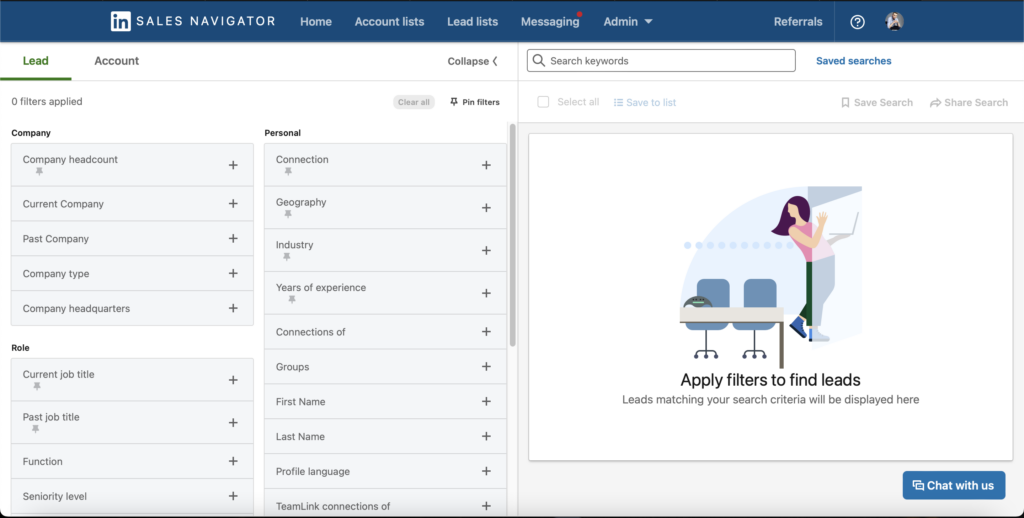
-Cleaner and more organized look and feel that includes:
-Collapsible two-panel view of all available filters for lead and account search to easily see all available filter options.
-Intuitive filter grouping that makes it easy to select the right filters for your search.
-Activating live results as filters are added and removed, allowing real-time refinement of search results.
Modifications to previously available Search items:
-The keyword search bar that was previously available at the top of the left column on the results page has been removed, but the search bar available above the search results provides the same functionality. You can use this search bar to locate keywords and boolean modifiers.
-Sales preferences have been removed, but Saved searches perform the same shortcut function.
Changes to previously available filters:
-Filter Became a Member has been removed.
-The Existing Leader and Account Activity filters are now combined and available as People you interacted with.
-The Contacts filter in CRM is now People in CRM.
New filters introduced:
-Buyer interest.
-TeamLink connections
-Saved leads
-Saved accounts
-Previously viewed
-Current company
-Previous company
-Company headquarters
-Teamlink connections in the Connections filter list
source: linkedin.com