
Adding certifications to your LinkedIn profile is a great way to showcase your professional accomplishments and demonstrate your knowledge to potential employers and connections. Follow these steps to add certifications to your LinkedIn profile:
Step 1: Log in to your LinkedIn account and go to your profile page.
Step 2: Scroll down to the "Achievements" section and click the "add certificate" button. Or click on "Add profile section" then "Featured" and select "Certificates".
Step 3: Select "Certificate" from the list of options and fill in the details of your certificate, including program name, issuing institution and date earned.
Step 4: If the certificate has a URL, you can add it in the corresponding field.
Step 5: Select the visibility level for the certificate.
Step 6: Click "Save" to add the certificate to your profile.
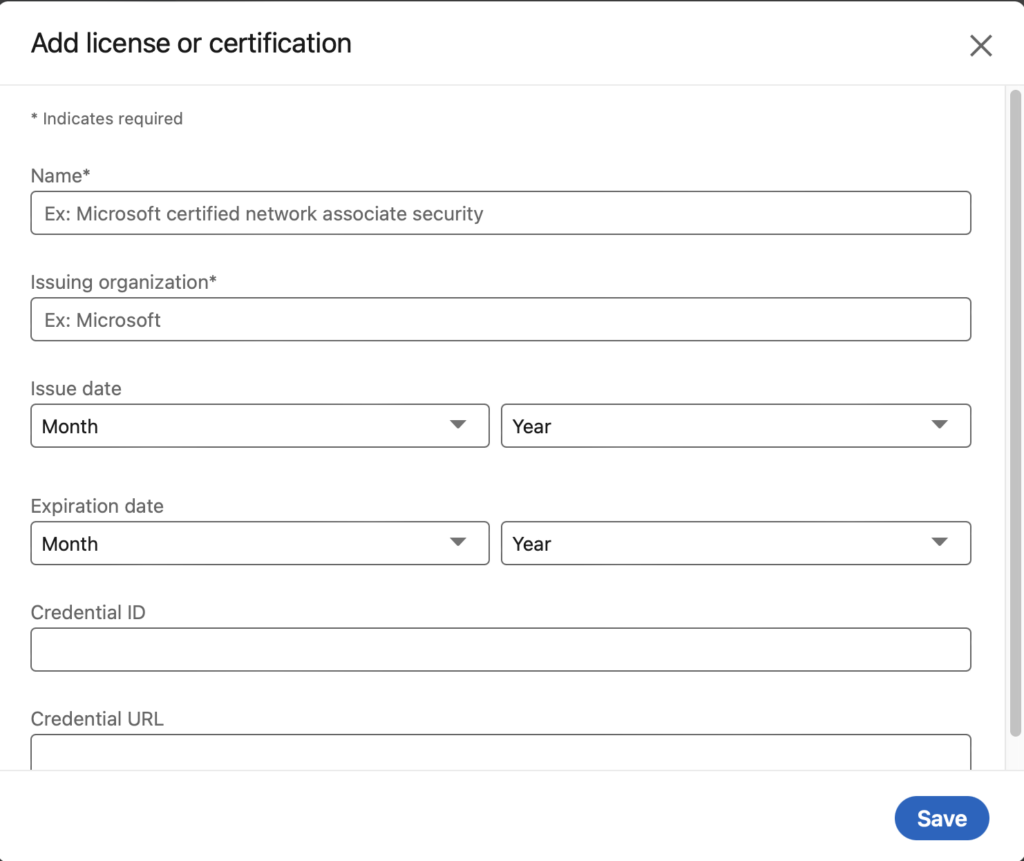
You can add multiple certifications by repeating the steps above. You can also add other types of achievements, such as publications, projects, patents, honors and awards.
Remember that you should only add certifications that are relevant to your current or desired career path. Additionally, it's a good idea to update your profile regularly, adding new certifications as you earn them.
Putting your certifications on your LinkedIn profile can help you stand out to potential employers and demonstrate your professional skills online. So take the time to add your certifications to your profile and show off your hard-earned accomplishments.
If you can't or don't have time to complete your personal profile, contact us and we'll help you! Take a peek at our website and don't delay! Your profile is your business card after all!