With alerts, you can notice changes in accounts and leads so you can take the appropriate steps in the sales process!
You can find Sales Navigator alerts on your home page. New alerts are displayed at the top of the page. Next to each alert is a suggested action to take. This helps you interact and engage potential customers.
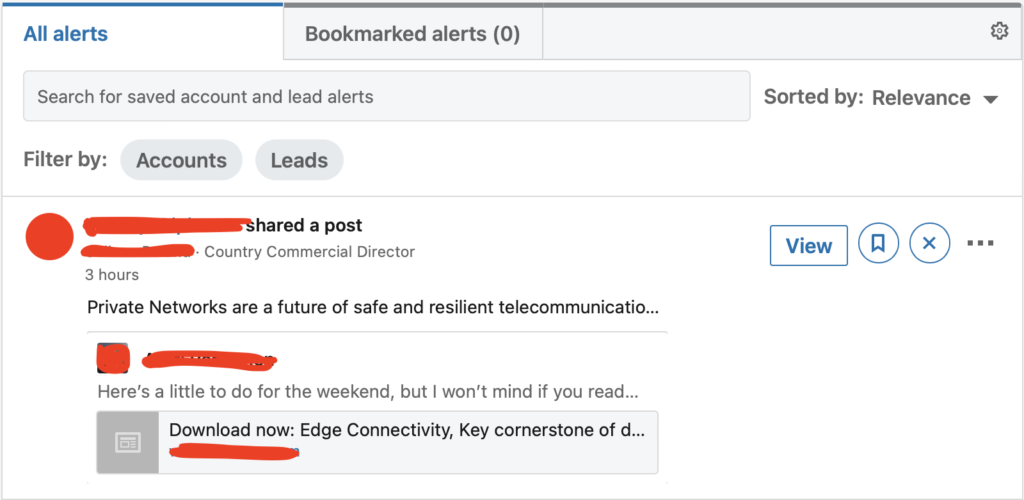
You can filter alerts by clicking the Filter button and selecting the type of alert to display. If you want to delete an alert or opt out of further alerts, click on the three dots next to the alert and choose Delete or Disable.
If you want to increase the number of alerts, sign up more leads and accounts.
LinkedIn recommends checking alerts 1-2 times a day. Once in the morning and once in the afternoon so you don't miss any important notifications.
Below is a complete list of available alerts:
Account News - mention in an article shared on LinkedIn.
Account Updates - An account that publishes a post, article, or photo.
Account Risk - When an account experiences layoffs or a decline in the number of employees.
Accounts Growth - An increase in the number of jobs published on LinkedIn, an increase in the number of employees or joining a new company.
Buyer Interest - The lead has engaged with your profile or company page.
Lead News - A mention of the saved lead in the news.
Lead Shares - The lead shared the post on LinkedIn.
Lead Career Change - The enrolled lead went to a new company.
Shared Activity - Shared activity between Sales Navigator accounts connected to you (via Teams, etc.).
Suggested Leads - Lead recommendations / display decision makers for leads you have recently visited.
New Decision Makers - The recorded account has hired a new employee for a director position or higher.
Updates from CRM Software - updates from CRM
Bookmarked Alerts
You can also bookmark alerts that you want to share with others or use at a later time. To bookmark an alert, click the bookmark icon to the right of the alert. You can bookmark sales alerts and track your leads and accounts. To view these alerts at a later time, click the Bookmarked Alerts tab at the top of the Alerts channel.
Alerts are undoubtedly a useful tool for keeping track of your customers. With alerts in Sales Navigator, you won't miss anything and you will always know all the news about your leads!