
LinkedIn Audio Events is a new way to bring together a professional community to connect, learn and be inspired.
Using an audio-only format, LinkedIn users can hold virtual events lasting from 15 minutes to 3 hours.
The experience is comparable to real conferences or meetings. Participants can join the event, listen to the speaker and share their comments!
Plus, you have the chance to share your interests with professionals from around the world!
Other social networks, including Twitter Spaces and Facebook's Live Audio Rooms, also have such a feature.
However, LinkedIn wants to differentiate itself in several ways:
LinkedIn plans to use internal data to show the most relevant professional events in users' feeds.
LinkedIn profiles are displayed during Audio Events, simplifying the introduction and networking processes.
With LinkedIn Audio Events, you can host live Q&A events, listen to your favorite thought leaders and network with other professionals.
How to join LinkedIn Audio Events
Joining an audio event on LinkedIn is as easy as clicking a button. All you have to do is accept an invitation from the organizer or get a link to the event from someone on LinkedIn.
All LinkedIn members can invite friends to events, share events and become a speaker at events (if approved).
If you have received an invitation to the event, click Join and wait for the event to begin.
Once you join, the host will be able to "bring you on stage" and let you speak. When speaking at an event, it is important to always be respectful of other users and keep your comments short and concise. LinkedIn Audio Event creators can always control who speaks and can mute participants at any time.
Remember that during an audio event, your presence is always public. During the event, you can also view the profiles of other attendees and start networking immediately.
How to create audio events on LinkedIn
1. click the Home icon at the top of your LinkedIn page
2. on the left side of the screen, click the + Add icon next to Events add audio event on LinkedIn
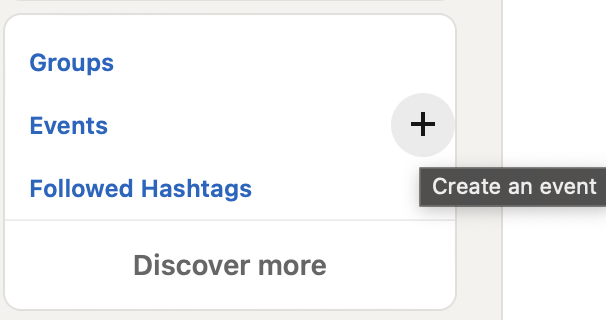
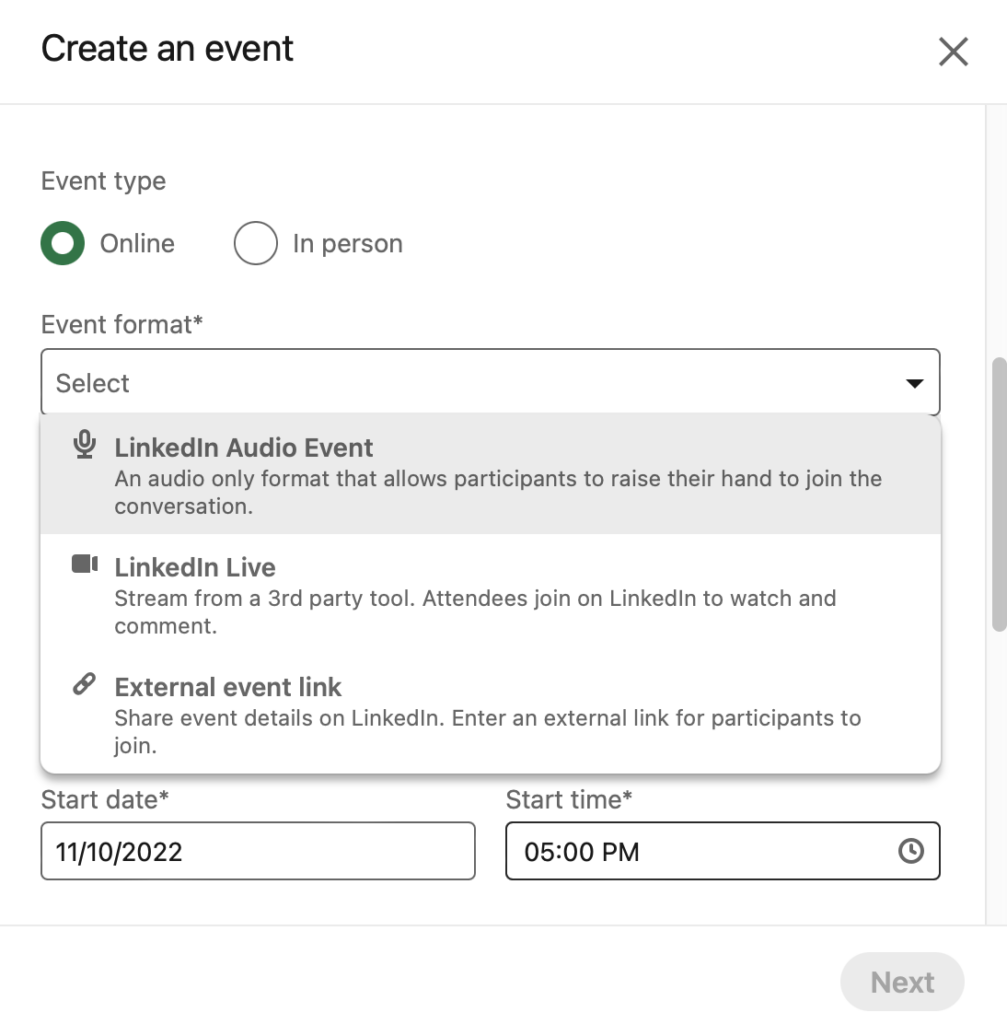
3. enter your event name, details, date, time and description. Create an event with a name, time zone, start date and end date
4. in the Event Format field, select Audio Event
5 Click Post, and you're done! This will share an automated post to your feed to let other LinkedIn members know about an upcoming event.
Tips for hosting an audio event on LinkedIn
Hosting an audio event on LinkedIn can be a great way to make more personal connections with your network.
As with any event, it's important to make sure you're prepared so everything goes smoothly. Here are some simple tips to help you become the host of your biggest audio event.
When organizing an Audio Event, be sure to plan the agenda to keep yourself and your guests on topic. You can invite participants to speak along with you, but you should have limits on how long each speaker can speak on stage.
To keep the event running smoothly, mute all attendees when they arrive at the venue and unmute them when they are ready to talk or ask questions. This will prevent background noise when others are talking, and will give you better control over what attendees hear during the event.
Encouraging participation in the event can help keep users engaged. Try asking your audience questions throughout the event and invite them to ask their own questions.
If you anticipate time for Q&A, be sure to include this in the initial event program.
Also remember to prepare enough content to keep users interested throughout your presentation.
LinkedIn recommends that you speak for at least 15 minutes during an audio event. This will give attendees time to join the event, read your content and ask questions if necessary.
Tips for promoting an audio event on LinkedIn
There is nothing worse than planning a great event and then discovering that you are speaking to an empty hall.
Often, failed events are the result of failed planning. So here are some tips to help you make sure your LinkedIn Audio Event is a success:
Make sure you promote your event well in advance. We recommend at least two weeks before it takes place. Invite attendees from your LinkedIn network using the Invite Connections button on the event page.
Include a link to the audio event in your promotional materials. This can include emails, social media posts, email signatures and even your website. As the event date approaches, post regular updates on LinkedIn so attendees don't miss out. Consider a live countdown to encourage people to attend and help them remember the event date.



