

Your profile on LinkedIn says a lot about you on both a personal and professional level, and you can display it in many languages. For example, if the main language of your LinkedIn profile is Polish, you can also display it in other languages, such as French, German or Arabic.
How does the "Add profile in another language" function work?
The primary language of your LinkedIn profile is the language you used to create your LinkedIn account. Keep in mind, however, that this language may differ from the language of your interface.
With Add a Profile in Another Language, you can easily duplicate your LinkedIn profile in as many other languages as supported. Once set up, LinkedIn members can view your profile in the language of their choice, provided it matches any of your additional profile languages. Otherwise, they can only view your profile in your primary language.
You can only have one profile for each language. And while there is currently no setting that allows you to directly change the language of the main profile, there is a simple workaround.
How to duplicate your LinkedIn profile in multiple languages
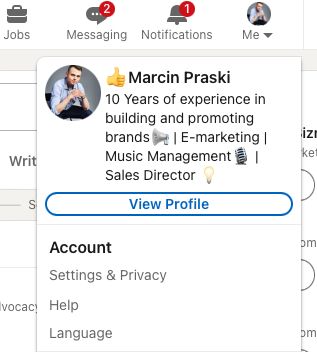
Go to LinkedIn, click Me at the top right of the screen, and then click View Profile.
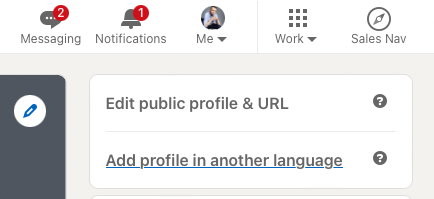
Then click on Add profile in another language.
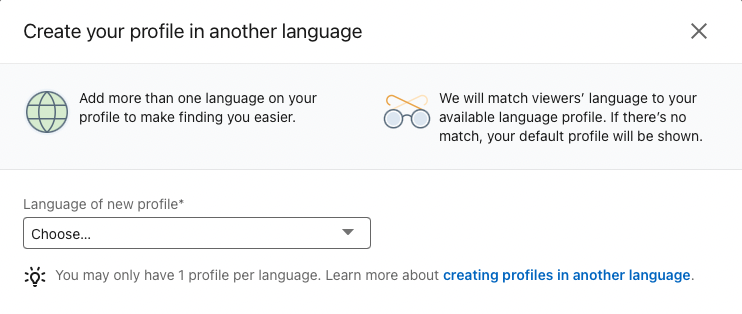
Select your new language from the drop-down list. Enter your name in the space provided. For example, if you have a French spelling of your name, you can use it to further distinguish this profile from your English profile.
Your new profile will now be reflected on your LinkedIn page. To access it, simply click Me, click View Profile and then click New Language.



