
LinkedIn Live is a powerful tool for professionals to connect with their audience, share valuable information and build their personal brand. With live streaming, you can engage with your audience in real time, answer their questions and provide valuable insights. In this article, we'll discuss everything a LinkedIn user should know about LinkedIn Live, including why you should start doing live shows, the organizational, technical and skill requirements for live streams, and how to access, schedule, promote and prepare for a live stream on LinkedIn.
Why start doing Live?
There are many benefits to starting to host live shows on LinkedIn. First, it allows you to connect with your audience in real time, providing them with valuable insights and information they can use in their professional lives. Second, it can help you build your personal brand and increase your visibility on the platform. By providing valuable content, you can establish yourself as an expert in your field and attract more followers, connections and opportunities.
Organizational, technical and skill requirements
To start Live on LinkedIn, you must have an account on LinkedIn. You will also need a device with a camera and microphone, such as a smartphone or computer. You will also need a stable internet connection and a quiet place from which to stream. In addition, you should have some experience in video production and be comfortable speaking in front of the camera.
LinkedIn requirements and recommendations
LinkedIn has a set of guidelines for live streaming on its platform. They recommend providing valuable, informative content and avoid promoting your products or services. They also recommend that you engage in conversations with your audience, answer their questions and encourage them to share their thoughts. In addition, they recommend that you start your live stream with a brief introduction and end it with a call to action.
Access to Live
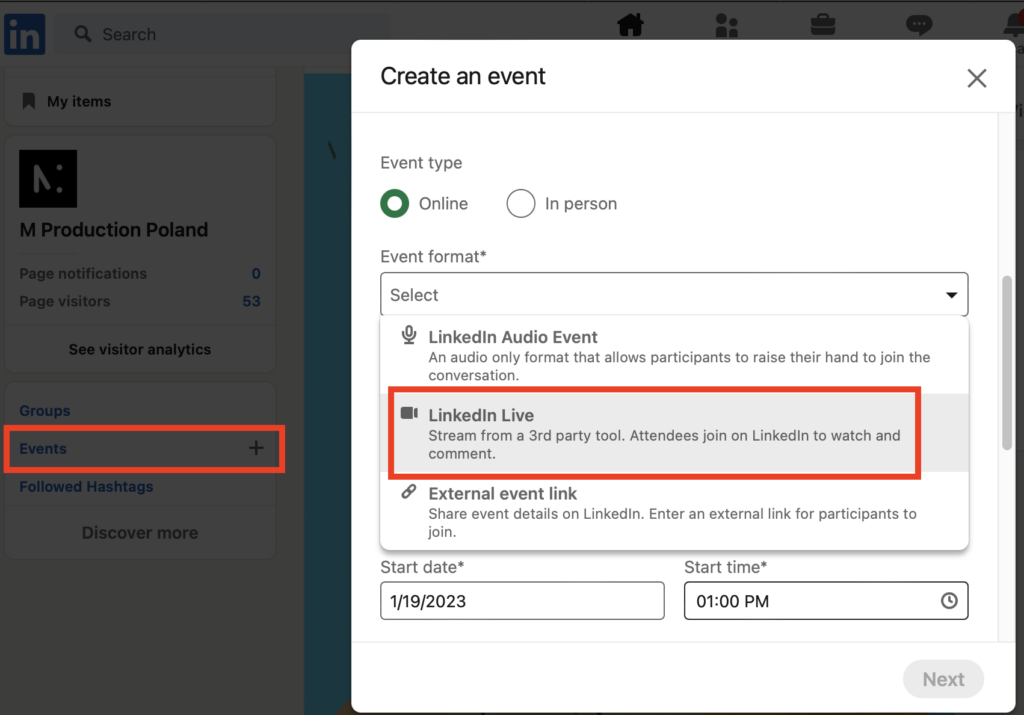
To access the live function on LinkedIn, click "Events" in the navigation panel on the left. Then create an event and in the format select "LinkedIn Live"
Scheduling a live broadcast
When you're ready to schedule your live stream, you can do so by selecting "Live Video" in Events. From there, you can set the date, time and title of your live stream, as well as write a short description to let your viewers know what to expect.
Live promotion
Once you have scheduled your live broadcast, you can promote it to your network by sharing the link on your profile, groups and other relevant LinkedIn communities. You can also use other social media platforms to promote your live broadcast and attract a larger audience.
Where the live stream will be visible
Your live stream will be visible on your profile, as well as in the LinkedIn Live section of the platform. It will also be visible to anyone who has a link to your live stream, even if they are not connected to you on LinkedIn.
Preparation of the content of the live broadcast
To prepare the content of your live stream, you should start by identifying the key conclusions you want to convey to your audience. You should also consider what format will be most engaging, such as a question-and-answer session, a tutorial or a panel discussion. Additionally, you should practice speaking in front of the camera and make sure you have all the necessary equipment and materials.
Structure of Live
The structure of your live stream should be well-organized and easy to follow. You should start with a brief introduction, giving viewers an overview of what they can expect from your live stream. This is also a good opportunity to introduce yourself and your topic. Next, introduce the main content of the live broadcast, which could include a question-and-answer session, a tutorial or a panel discussion. Finally, include a call to action, encouraging viewers to engage with the content and ask questions.
Attention to form and setting
To ensure that your live stream is engaging and professional, you should take care of the form and setting. This includes making sure you have a stable internet connection, a quiet location, and a clean and well-lit backdrop. You should also make sure you are dressed appropriately and that your camera and microphone are set up correctly. In addition, you should practice speaking in front of the camera so that you feel comfortable and confident during the live broadcast.
Engaging live participants
To engage live participants, encourage them to ask questions and share their thoughts. You can do this by opening a Q&A session or using the live chat feature on LinkedIn. Additionally, you should respond to comments and questions in a timely manner and make sure you address any concerns or issues that arise.
Checking live stats and what to expect
After the live broadcast, you can check the statistics to see how many people watched your live broadcast and for how long. You can also see how many people engaged with the live broadcast by asking questions or leaving comments. You can expect to see an increase in engagement and views during the live stream and then a decrease after it ends. However, your live stream will be available for replay and will be visible on your profile, increasing its visibility and engagement potential.
In summary, LinkedIn Live is a valuable tool for professionals to connect with their audience, share valuable information and build their personal brand. By following these tips, you can create a professional, engaging and informative live stream on LinkedIn. Remember to be well-prepared, engage with your audience and keep track of your live stream statistics.



