

On LinkedIn, there is a function called SSI, or Social Selling Index score. This number determines how effectively you use LinkedIn as a social media platform in four different categories:
- building your professional brand
- making the right contacts and expanding your network
- engaging with other people's content
- relationship building
Where to find the SSI score on LinkedIn?
As for where to find SSI LinkedIn, first you need to log into your account. Then you can either go directly to the SSI website or navigate to it, but it's hard to find:
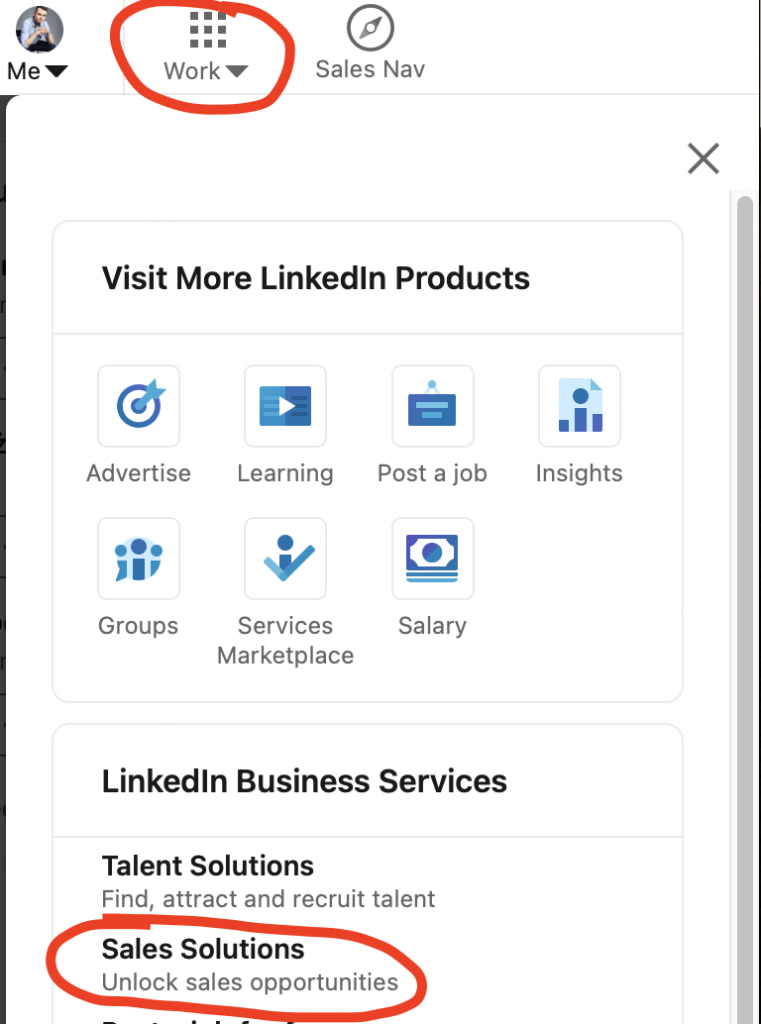
Click the "Work" menu in the right corner of the navigation bar.
Click on "Sales Solutions."
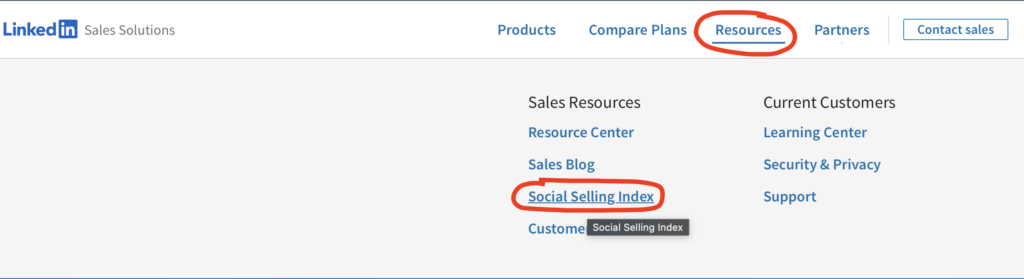
On the "Sales Solutions" page, hover over the "Resources" tab.
Click on "Social Selling Index."
On the banner, click "Get your score free".
What result is a good result?
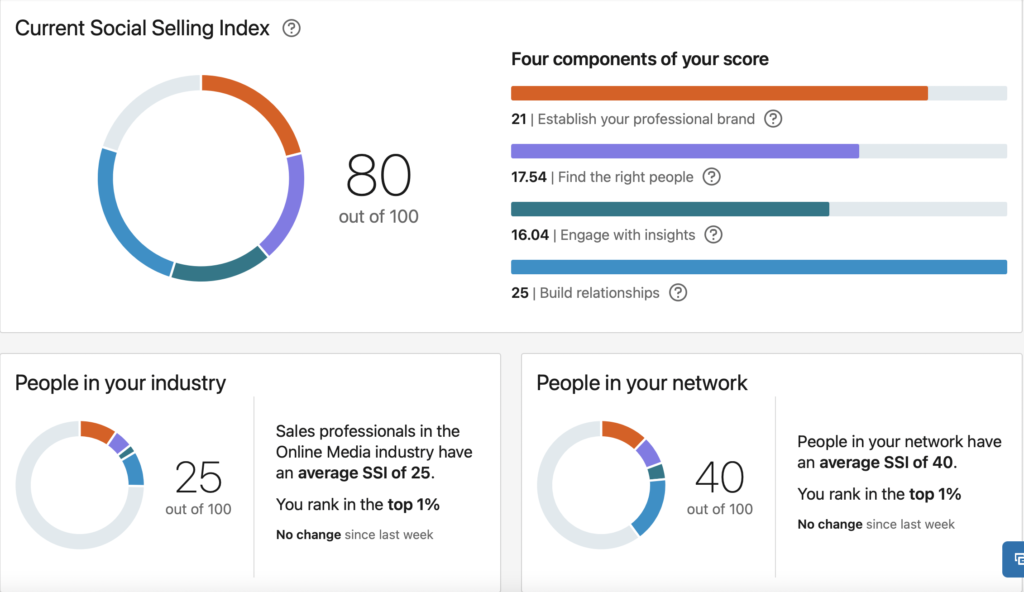
In general, industry leaders should aim for an SSI score above 75, and a score of 80+ means they are using LinkedIn quite effectively.
However, if you have your job title and industry set in your profile, the SSI page will tell you the average SSI score for your industry. This is the best way to find out if your score is good.
LinkedIn will also tell you your network's average SSI score and your ranking. It can even tell you if you are doing better this week than last week in your overall ranking in your industry and network.
How can you increase your SSI score?
LinkedIn measures your SSI in four categories. These categories are directly related to your use of features and tools. To increase your SSI score, you need to regularly post to your LinkedIn channel and groups, write articles and comment on others' posts, and make quality connections.
You can also pay for LinkedIn Sales Navigator. If you regularly use Sales Navigator tools to build lists of prospects and send messages to them, these activities will increase your SSI by up to 20% in six months, according to LinkedIn.
4 SSI categories:
Create your professional brand
Complete your profile on LinkedIn to rank as an All-Star, publish regular original content in the form of posts, LinkedIn Stories and articles, and share news about your industry. This will get more people viewing your profile, so it's worth it whether you're working on your SSI score or not!
The power of SSI's LinkedIn profile
Find the right people
The idea is to make effective use of LinkedIn's native search function, Sales Navigator and InMail to reach potential salespeople, decision makers and new employees.
Engage through insights
To improve in this category, comment on and share other people's posts. A mere "thank you" or "great post" is not enough - the SSI score also takes into account the length and quality of comments and share texts. That's why there are now many people on LinkedIn who comment on posts in depth!
Build relationships
Make contacts! Try to make quality contacts with people whose content you really care about, and network at the level of your peers. This will improve your feed on LinkedIn and your SSI score at the same time.
SSI - is it worth it?
Does LinkedIn's SSI tool matter? If your main social media platform is LinkedIn, then yes, it can matter. Since SSI is a measure of how effectively you're using LinkedIn, you can track whether you're upping your game on LinkedIn by watching your SSI score. With SSI, LinkedIn will tell you if you are using the platform in the right way.
Companies don't get an SSI score for their page on LinkedIn. But the skills you use to boost your personal SSI score are the same skills you can translate into publishing posts from your company page.
This can also be important for stimulating competition. If your company loves to promote its employees, tracking employees' SSI scores can encourage competition to use LinkedIn more often and better. Moreover, sales professionals are often quite competitive, so rankings that everyone can see and compare can be a nice gamification of serious business matters.



